
Spot three capture errors before uploading
Capture checklist for each session
Record these details in your session notes for each photograph, then repeat the setup at follow-up. Write down the actual camera distance and height; this guide does not prescribe fixed values.
| Item | What to record or check |
|---|---|
| Date and view | Date: ____; file name: ____; front / side (right or left side facing the camera) / back: ____. |
| Camera and lens | Device: ____; lens and zoom: ____; camera location, height and measured distance to the person: ____; keep the camera fixed and level. |
| Person’s position | Foot position on the floor: ____; body direction: ____; clothing and lighting: ____; show the whole body and clear contact between feet and floor. |
| Scale method | Method shown for this photograph: calibration target / height / foot length / height and foot length / no scale: ____; entered values and how they were measured: ____. |
| Scale verification | Was the target detected in this photo? ____; black square measured with a ruler: ____; print scale and target placement: ____; if using height or foot length, check the entered value against your measurement. |
| Missing details and changes | Missing view, unavailable or unverified scale, unclear landmark and differences from the previous session: ____. |
Print the A2 calibration target at 100% / Actual size. Use a ruler to check that each black square measures exactly 120 mm per side, excluding the white border. Reprint if the size is wrong. Lay the target flat on the floor, place heels on its line and include the whole target in the frame. After uploading, check that the tool shows target calibration for that photograph; merely having the target in the photo is not enough.
The tool uses the target scale when detected. Otherwise, with suitable inputs and image data, it estimates scale from entered height and/or foot length; do not record that estimate as target calibration. Without a usable scale, do not interpret distances in centimetres. Angles do not need a length scale, but still depend on image quality and landmark placement. A missing view remains unassessed.
Before taking photographs
- Keep the camera fixed and level. Avoid tilted views and ultra-wide lenses.
- Include the whole body and the feet touching the floor; do not crop the head or heels.
- Use even lighting, a plain background and clothing that leaves relevant landmarks visible.
- Stand comfortably in your usual posture instead of trying to look straighter.
Three views, one setup
| View | Check |
|---|---|
| Front | Face the camera without turning the trunk; include both sides. |
| Side | Stand fully side-on; avoid oblique views and covering points with the arms. |
| Back | Face away from the camera with the same standing position and camera setup. |
Before confirming landmarks
Zoom in and check each point against the photograph. Confirming an estimated point does not change its origin to detected. If a position is unclear, retake the photo or ask a practitioner.
Prepare for follow-up
Keep the camera, standing position, clothing, view and scale method consistent. A changed photograph can produce a changed number without a change in posture.
Start posture analysis · See the sample report
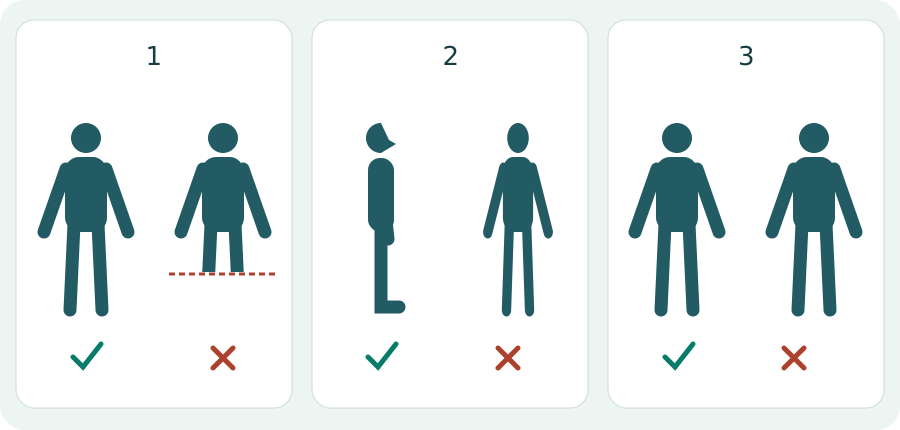
Check these errors before upload
| Error | Action |
|---|---|
| Head or feet cropped | Retake a full-body photograph; do not guess missing positions. |
| Oblique side view | Correct the direction of the body before repeating the photograph. |
| Clothing hides the landmark | Use a clearer photograph or seek practitioner help; confirming an unclear point does not improve its quality. |
| No length reference | Read the scale method. Pixel distances must not be interpreted as centimetres. |